Hey guys today we will be learning how to hide original MAC Address of your system and replace it with fake one. So What is a MAC Address and Why it is so important?
MAC Address stands for Media Access Control Address it is assigned to Network Interface Card(NIC) when it is manufactured. The MAC address is a string of usually six sets of two-digits or characters, separated by colons. MAC address is unique for all systems.
It is very easy to change mac address in backtrack as we can change mac address to any in a minute by using simple commands.
Let's start.
1. Open Terminal.
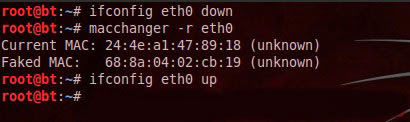
2. In terminal, type
4. Now change the mac address by using a simple command in backtrack.
5. You change your mac address to any number by using the following command.
6. Now configure the eth0 by a command
7. That's it you have changed mac address.
MAC Address stands for Media Access Control Address it is assigned to Network Interface Card(NIC) when it is manufactured. The MAC address is a string of usually six sets of two-digits or characters, separated by colons. MAC address is unique for all systems.
It is very easy to change mac address in backtrack as we can change mac address to any in a minute by using simple commands.
Let's start.
1. Open Terminal.
2. In terminal, type
ifconfig eth0 down3. The above command is used for disabling the eth0 interface.
4. Now change the mac address by using a simple command in backtrack.
macchanger --mac 00:11:22:33:44:55 eth0
5. You change your mac address to any number by using the following command.
6. Now configure the eth0 by a command
ifcofig eth0 up
7. That's it you have changed mac address.
Howdy! This post could not be written any better!
ReplyDeleteReading this post reminds me of my good old room mate!
He always kept chatting about this. I will forward this page to him.
Pretty sure he will have a good read. Many thanks for sharing!
ReplyDeleteIf you ever want to change or up your university grades contact cybergolden hacker he'll get it done and show a proof of work done before payment. He's efficient, reliable and affordable. He can also perform all sorts of hacks including text, whatsapp, password decrypt,hack any mobile phone, Escape Bancruptcy, Delete Criminal Records and the rest
Email: cybergoldenhacker at gmail dot com